
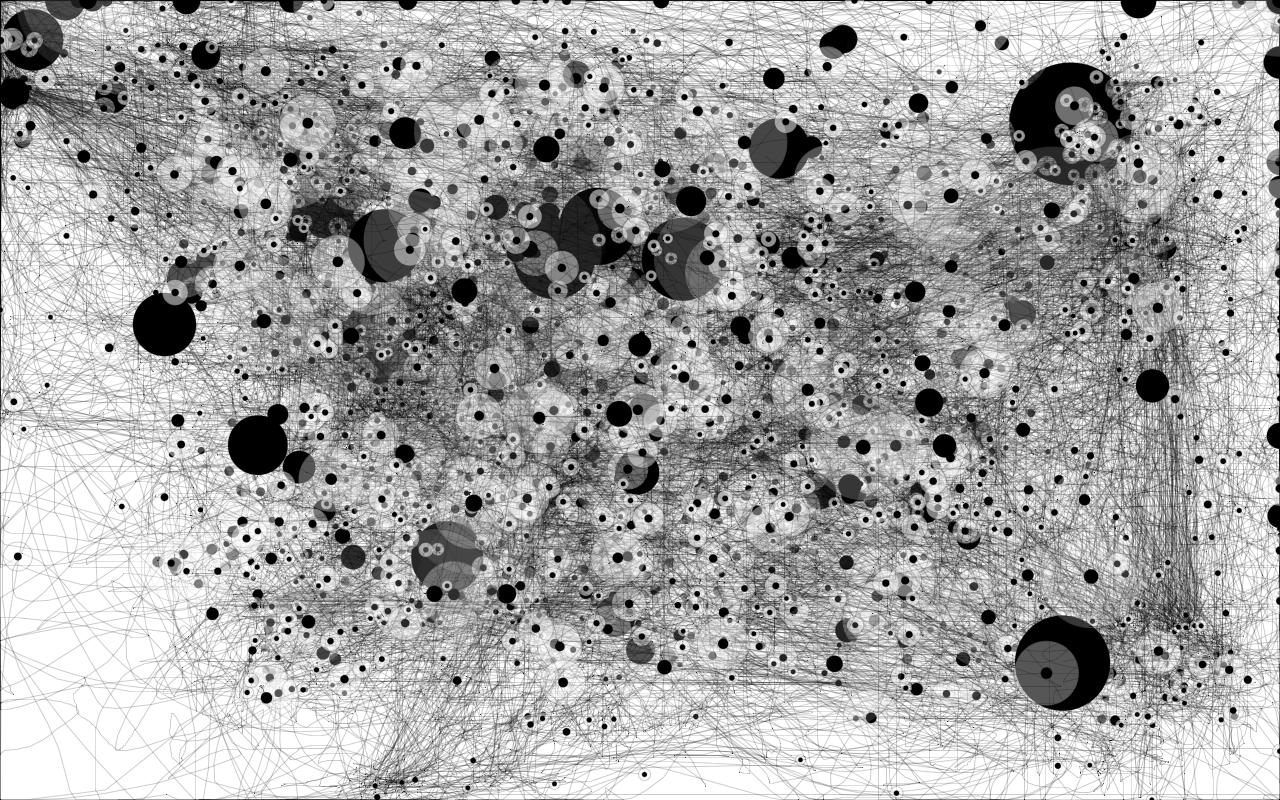
My mouse path.

Filed under art & design, work


Click to enlarge, please.

This is my mouse path for today, from 10:00am until 5:30pm. The lines are movement, and the dots are periods of inactivity. (The bigger the dot, the longer the rest.)

Makes a very busy day look beautiful, doesn’t it?

ETA: The application appears to have been created by Anatoly Zenkov. You find more information and links to download the app here.


48 Comments

  1. Posted February 5, 2010 at 5:34 pm

    Amazing. I just downloaded it and can’t wait to use it. It’s worthy of framing, and my type of art :)

  2. Jo in NZ
    Posted February 5, 2010 at 5:37 pm

    Love it, Anna!

  3. Posted February 5, 2010 at 5:55 pm

    so beautiful.

  4. Jenn
    Posted February 5, 2010 at 5:58 pm

    What a cool idea! Would you be offended if I tried this myself?

  5. Jenn
    Posted February 5, 2010 at 6:00 pm

    Oh, I just clicked on the link, and understand now!

  6. Posted February 5, 2010 at 6:06 pm

    very cool. thanks!

  7. Posted February 5, 2010 at 6:20 pm

    i want to give it a try myself

    tis very cool

    do you mind?

  8. Posted February 5, 2010 at 6:22 pm

    this is brilliant… art from the tip of your fingers. didn’t know you could create such works, huh? it will be worth millions {when you die}…

  9. Maria
    Posted February 5, 2010 at 6:24 pm

    I love it. art while you work!

  10. Posted February 5, 2010 at 6:32 pm

    wow, this is fantastic!

  11. Posted February 5, 2010 at 7:08 pm

    So cool! How do people think of this stuff??

  12. angie
    Posted February 5, 2010 at 7:36 pm

    wow! that is so cool!

  13. Posted February 5, 2010 at 7:44 pm

    It Reminds Me of the little Golden details on Klimt’s Works!
    Beautiful idea.
    I’ll try it too!

  14. Posted February 5, 2010 at 10:26 pm

    that is so cool!

  15. kelly w
    Posted February 5, 2010 at 10:47 pm

    Thank you, Anna. Love this.

  16. Posted February 5, 2010 at 11:28 pm

    love it!! thanks for sharing

  17. Kara
    Posted February 6, 2010 at 12:00 am

    Wow, I love this! Thanks for sharing.

  18. ATM
    Posted February 6, 2010 at 12:36 am

    So cool! The pattern makes me think your toolbar must be on the right.

  19. Posted February 6, 2010 at 6:57 am

    so cool!! so cool!!

  20. Posted February 6, 2010 at 8:37 am

    My brother-in-law (randaljones.com) is an artist and he created something like this quite awhile ago. Its not on his old website, but I believe he has had it in a show.

  21. Mister Koji
    Posted February 6, 2010 at 1:22 pm

    SOOOO COOL! OMG you are my greatest (and most enduring) source of inspiration!

  22. Steeven
    Posted February 7, 2010 at 3:49 am

    Hello,

    cool :)

  23. michail
    Posted February 7, 2010 at 5:47 am

    Would I be correct in saying you are an OS X user, Anna?

  24. Posted February 7, 2010 at 7:51 am

    Very nice visualisation! I did something very similar just the other week:
    http://www.flickr.com/photos/llemarie/4309501548/
    I didn’t mark idle times, but I might add that, it looks really good.
    Well done.

  25. Posted February 7, 2010 at 12:28 pm

    Hi!

    This has absolutely nothing to do with your mouse path, but I’ll say it anyway. I’ve followed your blog for a while now and I’ve noticed that you seem to like Finnish desing (like Aalto and Marimekko). I happen to live in Jyväskylä, Alvar Aalto’s hometown and alltough I do admire his work, I’ve got to confess that his style is a bit annoying too. See, our university’s campus buildings are mainly his, and let me tell you that they are as uncomfortable as they are beautiful! The stairs are weirdly-measured (about 1,5 footsteps each) and the legend is that he forgot to draw toilets to his original blueprints, so they had to be added later on (and are now extremely small closets in which you literally have to reverse into). All the furniture in the buildings are also Aalto’s designs, which is nice as long as you don’t have to sit on his wooden chairs for hours and hours each day.

    Anyway, I’m glad you like Alvar Aalto (and Marimekko). We Finns have this weird habbit of being extremely proud of our little northern country and we allways get a bit overexited when someone outside our snowy land notices us.

  26. Posted February 8, 2010 at 4:02 am

    Doesn’t work with dual screen monitors…

  27. Nicola
    Posted February 8, 2010 at 10:42 am

    Nice idea :) I definitely want to try but the app slows my computer to a crawl :(

  28. Posted February 8, 2010 at 1:01 pm

    This is fantastic and I can totally see it becoming a new wave in art!

  29. Posted February 8, 2010 at 4:14 pm

    This is terrific. Must add to kirtsy asap.

  30. Chasity
    Posted February 8, 2010 at 4:33 pm

    How do you save it? I clicked on S as it said in the application to save, but no save. :(

  31. Posted February 8, 2010 at 4:36 pm

    Woa! I started a mousepath/365 on February 1st on Flickr http://www.flickr.com/photos/thetrife/sets/72157623331589606/

  32. scyllacat
    Posted February 8, 2010 at 5:04 pm

    Sounds like time for screen capture.

  33. leah
    Posted February 8, 2010 at 5:40 pm

    Can it change color? Or can you use a different color? Multiple?

  34. Posted February 8, 2010 at 5:51 pm

    EVERYONE: Sorry, but I can’t troubleshoot the application. I didn’t write the code, I just downloaded it and let it run — I didn’t change any settings, it didn’t affect my computer’s performance, and I didn’t have any problems with it.

    I am on a Mac running Snow Leopard.

  35. Posted February 8, 2010 at 7:43 pm

    Obsessed. I’m determined now to compare each day to see if my pattern varies. Thank you for this!!

  36. Jonathan Carnehl
    Posted February 9, 2010 at 10:30 am

    Very cool. I wish that circles appeared where you clicked though. The black circles are too prominent for merely showing where nothing happened.

  37. Posted February 9, 2010 at 12:44 pm

    This is absolutely brilliant. I have decided that this will make a lovely valentines type of gift for my husband. It’s like a silent conversation. Reminds me of an etch a sketch whilst it’s doing it’s thing! Cool Thank you

  38. Posted February 9, 2010 at 4:02 pm

    Thanks for sharing! This is terrific and something that I think will be very useful for my students who are studying interior design. It’s a great visual way to explain how one should document traffic patterns in space.

    Love your blog.

  39. Posted February 9, 2010 at 6:14 pm

    Brilliant! Thank you for sharing!

  40. Posted February 9, 2010 at 8:06 pm

    that’s crazy. absolutely frameable. and i’m sure people are right now.
    thanks so much.
    huge fan

  41. Lori
    Posted February 9, 2010 at 9:02 pm

    Thanks for sharing, but maybe warn when you post a link that downloads automatically?

  42. Posted February 10, 2010 at 7:20 pm

    too super cool!

  43. frank
    Posted February 11, 2010 at 5:58 am

    Great idea. One can clearly tell that you’re on a mac.

  44. Yiff
    Posted February 11, 2010 at 11:54 am

    well, one can clearly tell that she’s not on windows because there are almost no lines leading to the lower left. there’s no particular reason to believe she’s using a mac, other than that she copped to it.

  45. Posted February 11, 2010 at 12:08 pm

    Yiff: I “copped” to using a Mac? No, sorry — I did nothing of the sort.

  46. Posted February 11, 2010 at 5:42 pm

    I’m amazed by how beautiful this image is… absolutely love it!

  47. old abe
    Posted February 11, 2010 at 6:35 pm

    @Yiff: she could be foolig everybody by having her taskbar on top. I used to put it up there when I was on xp

  48. Posted February 11, 2010 at 7:00 pm

    I USE A MAC. This is not a secret.

    Good grief.